Build log · LVGenStudio
Getting a much bigger model running, and the number that never moved
Product architecture, orchestrated with Claude Code
Before the rest of this, it is worth saying what actually happens when a clip generates — because I did not know either, and the last post ended on four frames of a face quietly turning into someone else with no explanation of why that is even possible.
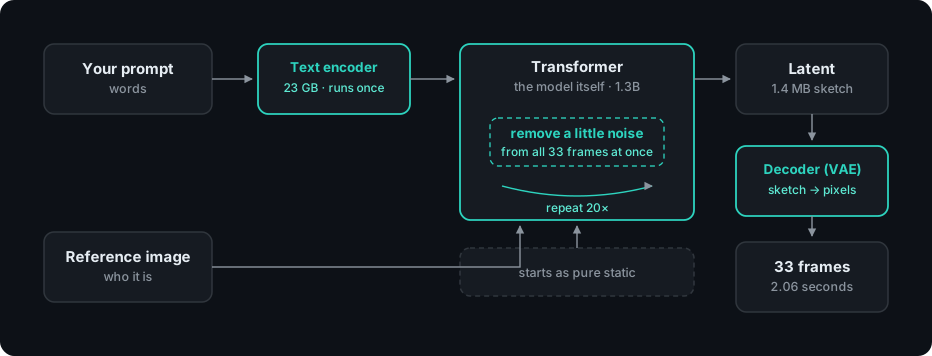
The part that surprised me: it does not draw frame one, then frame two. It starts with every frame as pure static, and removes a little of the noise from all of them at once — then does that again, and again, twenty times over. The picture arrives everywhere simultaneously, gradually, like a photograph developing.
Which explains the melting faces immediately. Nothing in that loop is holding onto who the person is between passes. Identity is not stored anywhere. It is an emergent property of a model large enough to keep resolving toward the same face — and if the model is too small, each pass drifts a little further, and by the end you have someone else.

I recommend watching this video if you want the actual math behind that loop — forward and reverse, step by step, explained better than I can summarise it here.
I am a UI/UX designer. I did not know any of this three weeks ago, and I am learning it in the order the problems arrive rather than in the order a course would teach it. That has a real cost — I have written wrong numbers into my own documentation, and one of them is the subject of this post. It also has an advantage I did not expect: I keep asking whether a step is necessary, because I do not know that it is. Someone properly trained would know the pipeline is correct and optimise inside it. I keep poking at whether the box should be there at all.
That is the whole approach here. I am a user who wants this to run on the machine he already owns, reading the theory carefully enough to bend it toward low-spec hardware rather than accepting that the hardware is the limit.
Now, the day itself.
The small model could not hold a face. So the answer was a bigger model, which meant more memory, which ran directly at the one number I had said I would not move.
LTX-2, 19B parameters, on an M1 Pro with 32 GB. Not through ComfyUI — directly in diffusers, which mattered because I wanted to understand what each piece was doing rather than wire boxes together and hope.
It took five specific things being right, and none of them were guessable:
- Use the distilled version of the model — the one built to run fast — not the full "dev" version, which needs far more steps to work at all
- Tell the loading code the model's real settings by hand, instead of letting it guess — its default guess was wrong and crashed the load
- Do the text-understanding step on the CPU, not the graphics chip — the graphics chip ran out of memory before generation even started
- Turn off a high-precision math mode the chip does not actually support — it was silently being downgraded anyway, so turning it off changes nothing except stopping a crash
- Load the audio-related parts of the model even when I only want video — the video half secretly depends on the audio half being present, or it fails
Miss any one and it either fails outright or produces something subtly wrong. I wrote all five down the same day, because I knew I would not remember why any of them mattered a week later.
Distilled weights are what the model actually is — the trained parameters it runs on. What the model and VACE build the frames from.
I will come back to VACE when it is the right time.
Then I looked at the faces.
They held. The thing the 2B model structurally could not do, the 19B model did — not perfectly, but recognisably the same person, frame after frame. The blocking problem for the entire product was solved by scale. Nothing clever. Just a bigger model.

The eight minutes that were doing nothing
The first honest generation took about 29 minutes for every second of video. I sat there watching that number and thought: no one is waiting half an hour for a two-second clip. Something in there had to be waste, not actual work.
So instead of just accepting the number, I asked where those 29 minutes were actually going:
| Where the time went | Minutes |
|---|---|
| Guidance computation | 8.3 |
| Dequantisation overhead | ~8.8 |
| CPU text encoding | ~8.3 |
| Actual hardware floor | ~4 |
That first row turned out to be pure waste — a step the model was running that, with the settings I was using, was not changing the output at all. Turning it off cut the time from 20.9 minutes down to 12.6 — a 40% drop from flipping one setting.
I did not find that by trying to make the machine faster. I found it by asking the boring question — where is the time actually going — instead of the exciting one. That has been true almost every time on this project.
The number I wrote into my own documentation
Around this point, "the app requires 32 GB of RAM" went into my project files as a fact.
The tool I was using told me the app had used 30.40 GB of memory. It looked like a real, official number, so I wrote it down and moved on — and for a few days, 32 GB was the product's minimum spec.
Which, if you read the first post, is the exact thing I said would kill it.
Here is what eventually gave it away: that number never changed. Not once. A tiny job and a huge job — roughly seventy times the actual work — and the tool reported the exact same 30.40 GB both times.
That is not how memory actually behaves. If a number stays exactly the same no matter how much work you give it, it is not measuring the work — it is stuck.
So I checked it a different way — asking the operating system itself how much memory the app was really using, instead of trusting the app's own report of itself:
| Workload | What the app claimed | What was actually used |
|---|---|---|
| 256×256, 25 frames | 30.40 GB | 8.10 GB |
| 448×640, 121 frames | 30.40 GB | 7.71 GB |
Under 8 GB, both times — and the bigger job actually used less, not more.
To make sure this was not a fluke, I capped the app at 12 GB on purpose and ran it again, so it would fail outright if it truly needed more than that.
677.1 seconds became 688.9 seconds. A 1.7% slowdown. Output identical.

The 32 GB requirement was never real. It was an artifact of trusting one tool's self-report.
Why this one still bothers me
I had already written down, on day one, that a tool needing 30 GB of memory has deleted most of the people who would have bought it. Then I spent several days with exactly that requirement sitting in my own documentation, because a number appeared and looked official.
The correction did not come from expertise I acquired. It came from noticing that something was constant when it should have varied. That is not a machine learning skill. It is the same instinct as noticing that every user in a research deck said the same sentence.
The method is now on the record for this project: measure with footprint, not the framework's self-report. Every memory figure I publish from here has to say which tool produced it, because I have now been badly wrong once and the only protection is showing the method alongside the number.
Three more memory figures in this project were later produced by arithmetic rather than measurement. All three were killed by measurement. It keeps happening, and the log keeps it.
A note on the name
The project was called LocalVideoGen for the first stretch — a description, not a name. It became LVGenStudio once it was clear the thing being built was not a generator with a UI bolted on, but a studio where generation is one stage among several. The rename came after the architecture, which is the right order and is not usually how I do it.
The moment that lasted ten minutes
I want to name the actual moment, because the rest of this project has a habit of moving past the good parts too fast to notice they happened.
The faces held. The memory figure was real, not assumed, and I had the method to prove it. The generation time was down by 40% from a single setting. After weeks of paying for a subscription and getting inconsistent output for my money, my own laptop, on a number I had personally forced down to 12 GB, produced something usable — for free.
For about ten minutes, that was the whole story, and it was a good one.
Then I opened the licence.
Next The celebration lasted about ten minutes
This is a running log of building LVGenStudio, a local video generation studio for Mac. Written as I go, including the parts that didn't work. Everything here is dated, and anything I later find out was wrong gets a retraction rather than a quiet edit.